I'm looking to transfer a project/board to another board in order the panelize them but I have no idea how to import them into another project and most of the time I ended up redrawing the whole thing which is really a PITA. does anybody know how to import a board into anotehr board so that I can panelize them?
Head-Fi.org › Forums › Misc.-Category Forums › DIY (Do-It-Yourself) Discussions › Panelizing with Eagle?
Join Now
Be a part of the community.
It's free, join today!
Recent Reviews
-
I revised and expanded my original review. It can be found here: http://www.head-fi.org/t/585281/review-brainwavz-hm5-a-new-neutral-champ/375#post_8031882
-
My first "Pro" set of IEM's. I guess I am only 2 days into this set of Shure 215's but I have enjoyed every note of my music experience. Sound Isolation is great, although I am comparing to mass...
-
I don't intend to rate or review the festive Gunmetal Black Crossfade LPs. I wish only to say what Head-fi's strangely inclusive database will not -- that I owned them ever-so-briefly but no...
-
Just wanted to share my thoughts on the vaunted m50's...not that more reviews are needed. First off, I couldn't be happier with them except for the comfort level. I need a break from them after...
-
THIS IS A WORK IN PROGRESS I'll complete it over time I unboxed my new pair of cans that I received used from Syrk a two hours ago. When I put them on my head, the first thing I...
Head-Fi Sponsors
Drop by and thank our partners for helping keep the lights on at Head-Fi!
Panelizing with Eagle?
- kin0kin
- Trader Feedback: 0
-
- offline
- 2,814 Posts. Joined 1/2005
- Location: Markham, Ontario, Canada
- Select All Posts By This User
hello? some help please? nobody tried to panelize with eagle? 

post #3 of 14
3/22/06 at 1:43am
- Pars
- Trader Feedback: +1
- Can Jam '10 Organizer
-
- online
- 4,003 Posts. Joined 10/2003
- Location: Chicago
- Select All Posts By This User
Well, since no one else stepped in...
I'm not sure that you can panelize in Eagle. I think you need to take the generated Gerber files and use some panelization software to lay those out. Perhaps the full ($$) version of Eagle can do this (you didn't specify what you have).
post #4 of 14
3/22/06 at 2:28am
- Paragon
- Trader Feedback: 0
-
- offline
- 425 Posts. Joined 7/2001
- Location: Michigan
- Select All Posts By This User
Quote:
| I'm using Eagle to create a small board that is 3" x 3". Is there any easy way to create the output files with a 3x3 grid of my little board? Do all the following steps with a copy of your board file: Use panelize4.ulp to copy the device names into a separate layer (so they won't be renamed there during multiplication). Enter DISPLAY ALL and then GROUP the complete board. CUT it into the buffer, and don't forget the final mouse click to set the reference position. PASTE it as many times and where you like it. Save the panelized board at another name. For CAM data generation, use _tnames instead of tNames for the silkscreen file. Alternatively, you can use GerbMerge to panelize one board multiple times, or panelize different jobs into a single board. It is a free (GPL) program. |
I tested it with one of the sample projects and it seems to have worked. No errors or anything from what I gather.
<>BTW, this will be near impossible to do if you do not have an upgraded version as you will probably run out of useable space fairly fast.
- kin0kin
- Trader Feedback: 0
-
- offline
- 2,814 Posts. Joined 1/2005
- Location: Markham, Ontario, Canada
- Select All Posts By This User
hi people, thanks for the reply. have the full version of Eagle
I'll give that a try tomorrow. I might end up using a gerber merger if that makes things easier. Now i have to figure out how to out the boards properly since the company doing the pcb doesnt cut panelized board.
I'll give that a try tomorrow. I might end up using a gerber merger if that makes things easier. Now i have to figure out how to out the boards properly since the company doing the pcb doesnt cut panelized board.- kin0kin
- Trader Feedback: 0
-
- offline
- 2,814 Posts. Joined 1/2005
- Location: Markham, Ontario, Canada
- Select All Posts By This User
ok i tried that, it works...but not exactly what i am looking for. I am looking to import another board, instead of just panelizing the same board.
i.e.
Board A: 4 X 4
Board B: 4 X 2
I want to panelize 1 X board A and 2 X Board B to a 4 X 8 board. But the above method only allows me to panelize a particular board. There must be some way to import the other board...there are lots of ulp available but i dunno what exactly each do.
i.e.
Board A: 4 X 4
Board B: 4 X 2
I want to panelize 1 X board A and 2 X Board B to a 4 X 8 board. But the above method only allows me to panelize a particular board. There must be some way to import the other board...there are lots of ulp available but i dunno what exactly each do.
post #7 of 14
3/22/06 at 4:53am
- cetoole
- Trader Feedback: 0
-
- offline
- 1,275 Posts. Joined 11/2004
- Location: Hoboken
- Select All Posts By This User
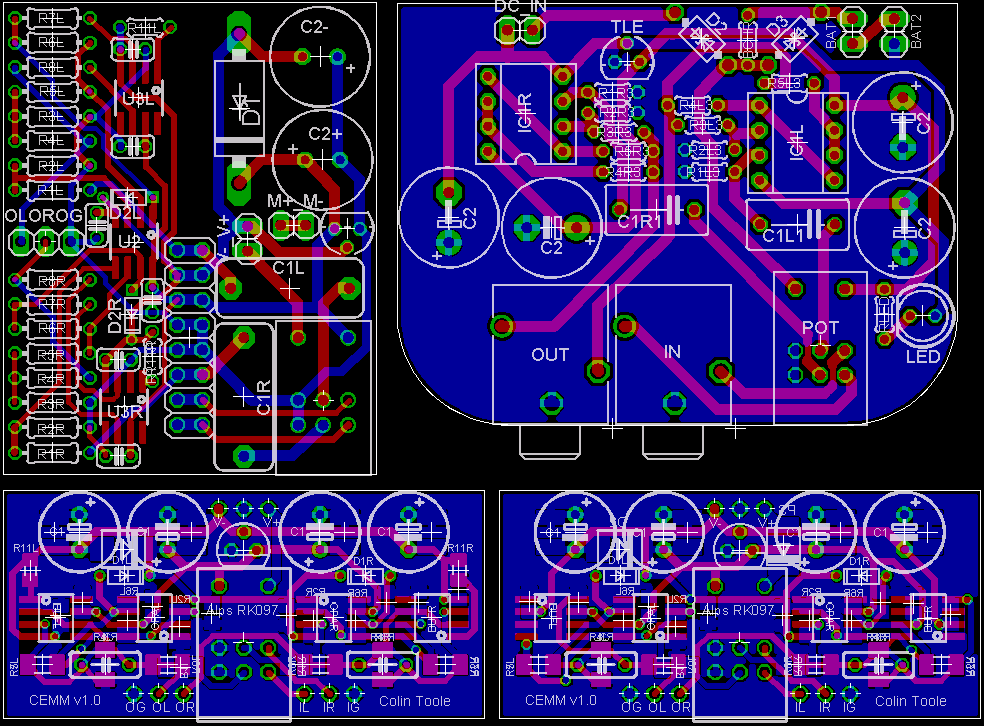
Panelizing in Eagle is pretty simple, I just figured it out tonight. All you have to do is use the Group tool to select an entire board, cut it, then in the same window, create a new board file, and paste it in. For the other boards, just open their *.brd files, select them, cut, then open the saved panel board file, and paste it in. Using the same window is critical here, they have their own paste buffer, and you cannot copy and paste between different instances of eagle. Here is a quick picture of 4 of my amp boards panelized this way.

Kudos to the first to name all 4.

Kudos to the first to name all 4.
post #8 of 14
3/22/06 at 7:57am
- rsabo
- Trader Feedback: 0
-
- offline
- 608 Posts. Joined 10/2005
- Location: Pennsylvania
- Select All Posts By This User
clockwise from top left:
thru-hole mint
some kind of CMoy?
bottom are both your SMD mints, but the one on the left has a bandwith-setting resistor for the buffers
thru-hole mint
some kind of CMoy?
bottom are both your SMD mints, but the one on the left has a bandwith-setting resistor for the buffers
post #9 of 14
3/22/06 at 1:22pm
- Paragon
- Trader Feedback: 0
-
- offline
- 425 Posts. Joined 7/2001
- Location: Michigan
- Select All Posts By This User
Try doing that with the same board. You cannot just copy and paste the same board without using the ULP. Actually, you got away with it because you named all your parts differently. You can't have two parts with the same name so if you have a board with R12 being the last resistor, when you copy and paste, you will end up with R24, by the time you get through a panel, you could end up with a board that has R109-R120.
<>See my below post #11 for proper way to panelize from multiple files.
I was still tired from last night so I missed a few posts above. I was just explaining here that without using the panelize.ulp, your part names will change on you. Sometimes you will even get errors when you try paste without panelizing first.
<>See my below post #11 for proper way to panelize from multiple files.
I was still tired from last night so I missed a few posts above. I was just explaining here that without using the panelize.ulp, your part names will change on you. Sometimes you will even get errors when you try paste without panelizing first.
- kin0kin
- Trader Feedback: 0
-
- offline
- 2,814 Posts. Joined 1/2005
- Location: Markham, Ontario, Canada
- Select All Posts By This User
still looking for an absolute solution done directly in eagle. The parts do have similar names in both boards and I'd need to retain it that way for the silkscreen. I'm sure there is a way to do it, I'm rather busy during week days and have little time to tinker with them, I'd really appreaciate if people could spoon feed me with a solution (i hate being spoon fed and i know ppl hate doing that but........
)
EDIt: oh wait, I misread Paragon's comments.....so cetoole's solution does work in my situation? I only need to panelize 2 boards together and there are different boards.
)EDIt: oh wait, I misread Paragon's comments.....so cetoole's solution does work in my situation? I only need to panelize 2 boards together and there are different boards.
post #11 of 14
3/22/06 at 2:37pm
- Paragon
- Trader Feedback: 0
-
- offline
- 425 Posts. Joined 7/2001
- Location: Michigan
- Select All Posts By This User
Open your first file
Execute panelize.ulp
Group
Cut (don't forget origin click)
Open your other file
Save as different file name
Execute panelize.ulp
Paste the other board in
Enjoy.
<>yeah.. I can be a bit confusing at time especially when I am tired. I missed your post #6 and was assuming you needed to just panelize one file. Hope this solves it.
Execute panelize.ulp
Group
Cut (don't forget origin click)
Open your other file
Save as different file name
Execute panelize.ulp
Paste the other board in
Enjoy.
<>yeah.. I can be a bit confusing at time especially when I am tired. I missed your post #6 and was assuming you needed to just panelize one file. Hope this solves it.
- kin0kin
- Trader Feedback: 0
-
- offline
- 2,814 Posts. Joined 1/2005
- Location: Markham, Ontario, Canada
- Select All Posts By This User
Quote:
|
Originally Posted by Paragon
Open your first file
Execute panelize.ulp Group Cut (don't forget origin click) Open your other file Save as different file name Execute panelize.ulp Paste the other board in Enjoy. <>yeah.. I can be a bit confusing at time especially when I am tired. I missed your post #6 and was assuming you needed to just panelize one file. Hope this solves it. |
, will give that a try later
post #13 of 14
3/22/06 at 5:27pm
- Paragon
- Trader Feedback: 0
-
- offline
- 425 Posts. Joined 7/2001
- Location: Michigan
- Select All Posts By This User
I must have been tired when I was ordering parts.. ended up ordering the prototype board with NO planes. Bummer. Either I spend $10 or so in shipping to get what I was expecting, or I figure out something else for grounding and interference suppression.
Oh well..
Oh well..
post #14 of 14
3/22/06 at 5:58pm
Quote:
|
Originally Posted by rsabo
some kind of CMoy?
|
*cough* my A47
he stoeld it...
Return Home
Back to Forum: DIY (Do-It-Yourself) Discussions
Head-Fi.org › Forums › Misc.-Category Forums › DIY (Do-It-Yourself) Discussions › Panelizing with Eagle?
Currently, there are 2066 Active Users
(554 Members and 1512 Guests)
Recent Discussions
- › Show us your Head-Fi station at it's current state. No old... 3 seconds ago
- › The ATH-CKM50. The CKM family impressions... 11 seconds ago
- › UE 700 Tips + MTPC = Brilliance 1 minute ago
- › MAJOR SALE: HD600, DT770, IE8, SE535, HEADSIX, IPOD LOD 2 minutes ago
- › Headset Recommendations? - <$80-100 2 minutes ago
- › Ultrasone Pro 900 Appreciation Thread 2 minutes ago
- › MAJOR SALE: HD600, DT770, IE8, SE535, HEADSIX, IPOD LOD 3 minutes ago
- › Schiit Lyr - The tube rolling thread 4 minutes ago
- › FiiO E5 amp (E3 upgraded) 4 minutes ago
View: New Posts | All Discussions
Recent Reviews
- › JVC HAX580 DJ Style Monitor Headphones by BearSpace
- › BRAINWAVZ HM5 Studio Monitor Headphones by manveru
- › Shure SE215 Black by Davis4Ever
- › V-MODA XFLPR-GUNBLACK Crossfade LP Overear Headphones (Gunmetal Black) by scrypt
- › Audio-Technica ATH-M50S by MattTCG
- › Grado Prestige Series SR80i Headphones by Oeufdepoire
- › Sennheiser HD 580 by Swimsonny
- › Fischer Audio DBA-02 by Swimsonny
- › V-MODA Crossfade M-80 by mandy78
- › Electric Avenues PA2V2 by mikek200
View: More Reviews
Recent Articles
- › Headphone Buying Guide by keanex
- › Fostex T50RP modification summary LINKS - wiki by ardilla
- › Comparisons of the LCD-3 and the LCD-2 Rev. 2 by MacedonianHero
- › Posting Guidelines by Currawong
- › Comparisons of LCD-2 Rev. 1 and Rev. 2 by MacedonianHero
- › Membership Levels, Badges and Custom Titles by Currawong
- › Sennheiser Hd4 8 Modding For Newbies by koolkat
- › Grado Pad Choices And Mods by Maverickmonk
- › Grado Modification Overview by maxsayer
- › How To Open Your Grado Headphones by chrislangley4253
View: Recent Articles | All Articles
Home | Head Gear | Forums | Articles | My Profile
About Head-Fi.org | Join the Community | Advertise
© 2012 Head-Fi.org is powered by Huddler Tech | FAQ | Support | Privacy/TOS | Site Map
About Head-Fi.org | Join the Community | Advertise
© 2012 Head-Fi.org is powered by Huddler Tech | FAQ | Support | Privacy/TOS | Site Map